A while back my wife was looking at those giant, digital wall calendars like “Skylight” and mused that it might be cool to have one. So I did some research and couldn’t decide on what size to get. About $300 for the 15 inch version, or should I spring for the 27 inch version at $600?
I realized I needed to test out the idea of the family calendar before we could decide if it was worth the investment and I asked myself “Why not just vibe code one?”
So I got Google Antigravity up and running and hooked up to my GitHub and got to work. 10-20 hours later I had the “Family Hub”:
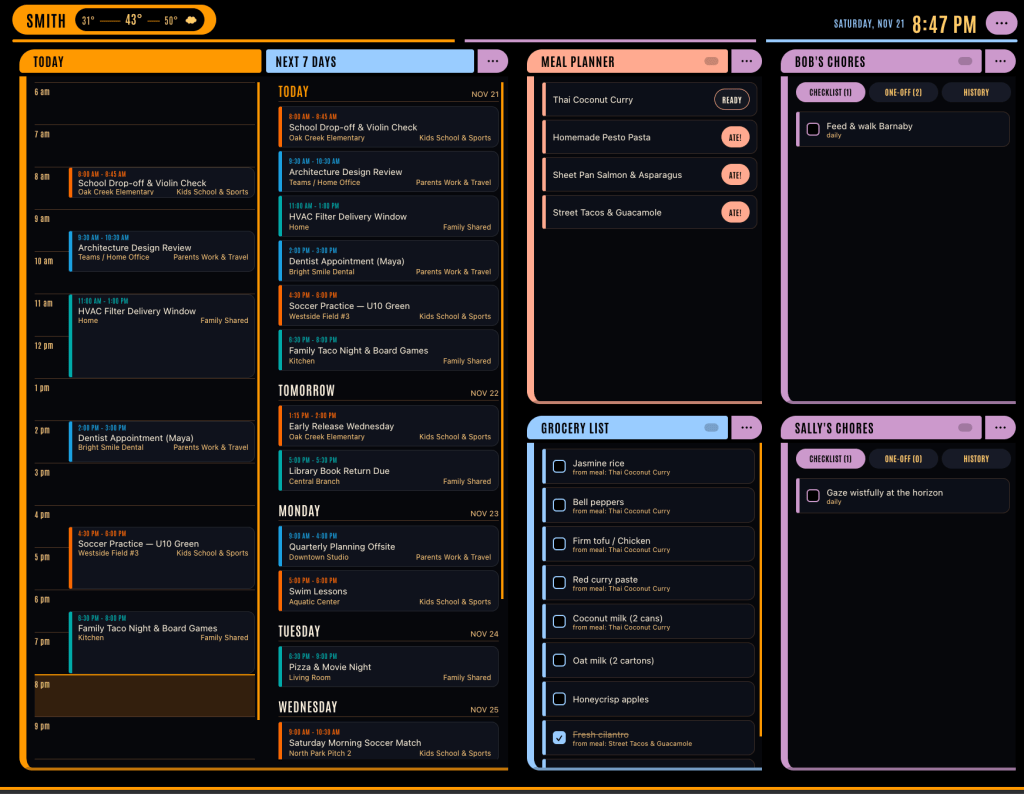
This is all just built in demo data, but you can see it has a calendar, meal planner, chore charts, and more. Plus it’s in the style of LCARS of Star Trek fame!
(I actually went crazy with the themes and wound up with twenty. Here’s a bonus screenshot with another theme, although we have normal, boring themes too:
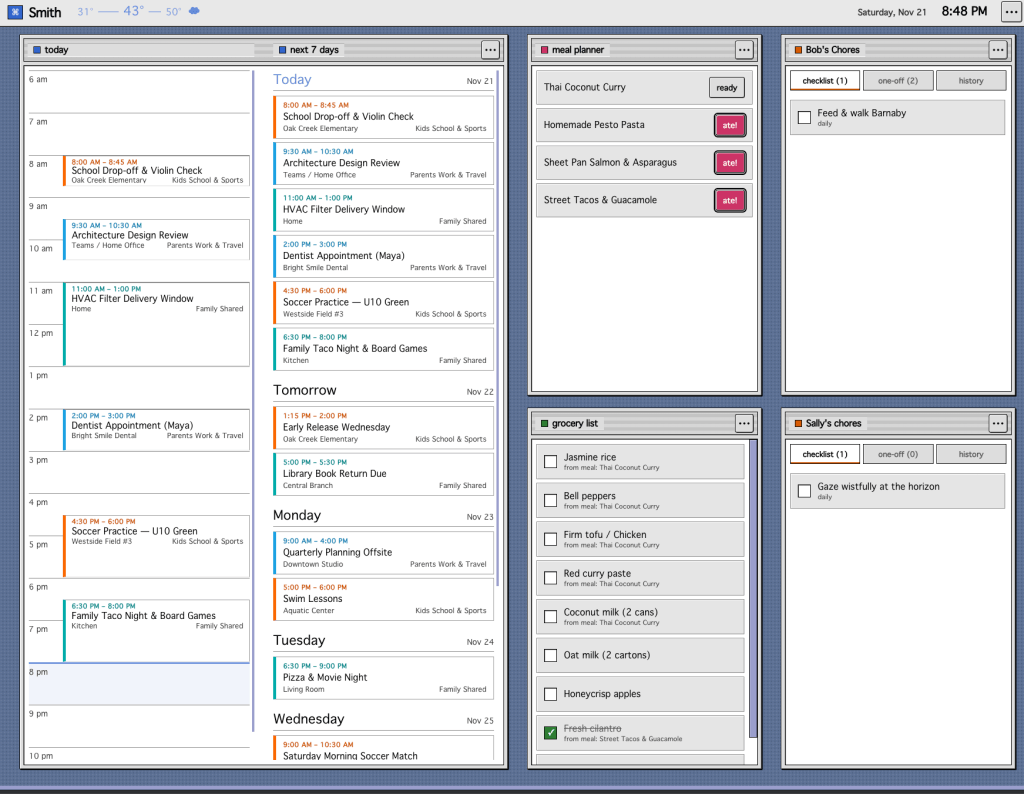
isn’t that fun?)
If you want to play around with it you can find the code at the FamilyCoordination github repo. I set it up on a local server on my LAN (more on that later) and configured it as a Progressive Web App (PWA) On a tablet in our kitchen. We’ve been using it for almost a week now and I can say the chore charts have been a big hit with the kids, the calendar is handy but maybe not as useful as we might’ve thought (we’ll see how it goes on a busier week, though), and we haven’t really started using the meal planner yet.
But! We got a version of a digital calendar with features useful for our family out relatively quickly with almost no cost (the tablet already lived on the kitchen counter, and the “server” was just an old mini PC gathering dust), and we’ve been able to try it out and learn what works (chore charts!) and what doesn’t (so far meal planning! But give us some time to figure it out). So what have I learned from this experience? What should you do if you’ve been thinking of vibe coding an app?
1. It helps to know something about UI/UX
Most of the vibe coded apps I see are rough. That’s because what makes perfect sense to one person is a complete mystery to someone else.
Good design is an art, and it takes time and experimentation. I ran a web development team for a few years, and, luckily for me, we didn’t have a designer and the programmers HATED designing. They just wanted to be handed a user story with a mockup and colors and everything so they could get to work.
But it was just myself and the coders, and someone had to design, so I took it on myself. I read every book I could find, but one that really helped it click was Steve Krug’s “Don’t Make Me Think” (I’ve linked here to the fourth edition, which may be out or is soon to come out depending on when you’re reading this).
Our biggest redesign was the entire checkout process, and it wound up being a big hit — abandoned carts dropped 30% after we rolled out the new workflow. If you’re not familiar with Ecommerce speak, a 30% reduction in abandoned carts is a big deal!
Design isn’t necessarily complex, but it’s not intuitive either. If you’re going to vibe code something, do yourself a favor and at least read Steve’s book.
2. You’ve got to secure it somehow
I did not review every line of code in this vibe coded app — that would defeat the purpose. So I don’t know the quality of the code. It works! Is it good? Is it secure? I don’t know. Perhaps only AGI themself can ever truly know.
That means that I should assume it is insecure, which is what I do. And since I’m running insecure code, I need to find someway to contain the blast radius should something go wrong. So we did a few things:
- The app runs on a local server on our home network — it’s not connected to the cloud, there’s no way to access it outside our house, it is strictly local. This means in order to hack it someone has to be at our house (super unlikely) or on our network remotely (less likely but not impossible)
- The app is almost entirely self contained so recipes, chore lists, etc. are created on the server, and stay on the server.
- It purposefully interacts with sensitive data as little as possible. The most sensitive thing (the calendar) is a read only feed — there’s no way to modify it, and if someone should access it, they can get locked out relatively easily.
That’s what it took to create an app I felt comfortable using even if the code isn’t perfectly secure. And you know what? Those are some limitations! No access outside the home. Everything self contained. Limited access to data. That’s not the “Everything is connected” AI metaverse that Mark Zuckerberg promised me!
But it doesn’t need to be. It’s a family hub that lives on my kitchen counter and does exactly what I need for my family. That’s handy! It was enabled by AI, but I don’t need AI to run my life or do everything for me. Just making it easier for me to run my own life is plenty.
3. Get recursive!
Recursion is a programming term for when something calls itself in order to accomplish a task. For example, you might have a mathematical algorithm that calls itself over and over again to figure something out.
One of the advantages of an LLM is that you can get a “fresh set of eyes” by just opening up a new chat and having the LLM look at the work a previous LLM did. You should ALWAYS do this for security reviews, likely multiple times (I’ll usually do a couple times with different models to get different “perspectives”), but it’s also handy for things like architectural or design reviews — especially if you aren’t an architect or a designer yourself.
But an LLM can also get better at working with you over time. Every has a good version of this called “Compound Engineering” that you can import into a chat session and use, but I’ve found that a little heavy handed. You’ll notice in mine I have a simple document called “Working with Josh” that outlines my preferences in design, development, and interaction. It also outlines some of my blindspots — things that I’m unlikely to think of that a real programmer probably would.
Now, a single prompt wouldn’t suss out that many details from me, but over time the “Working with Josh” has gotten updated multiple times and has become more and more accurate, and I encourage you to set up something similar.
For the reviews, you don’t have to go crazy either. I’ve put some example prompts in the appendix (because no one likes it when you interrupt the flow of a blog post to go “hey, check out what this LLM did!”), so feel free to peruse those if they interest you.
4. It’s an experiment!
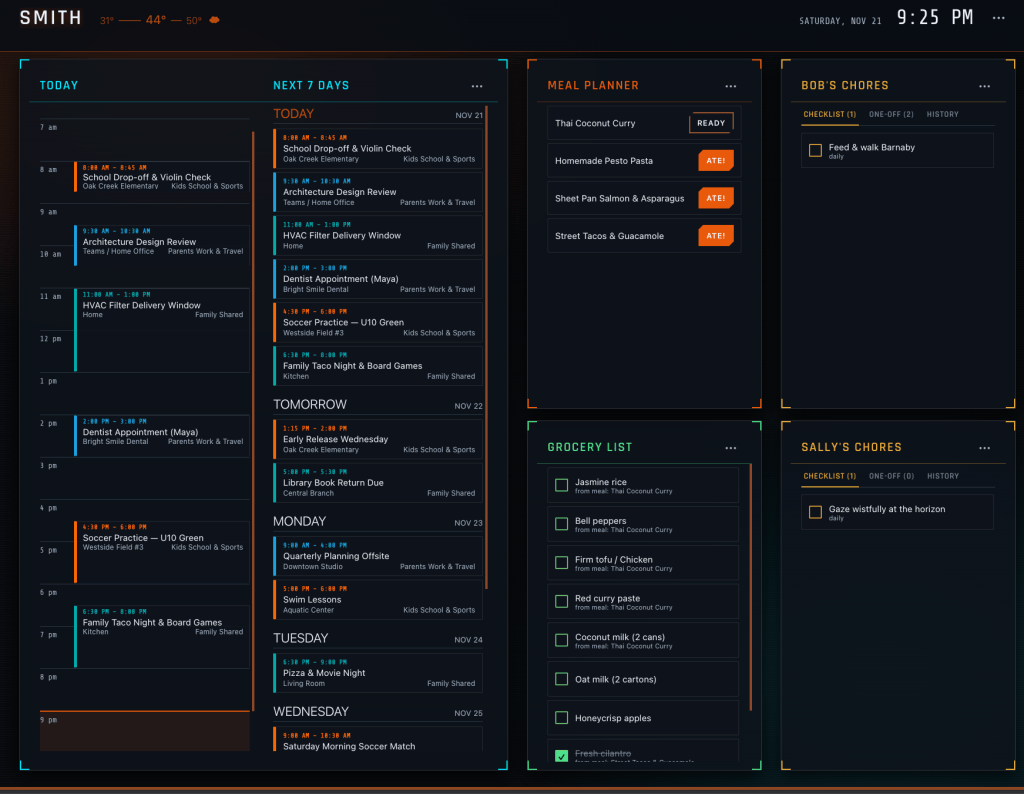
And you may end up wasting a lot of time! I mean, I definitely didn’t need to make 20 themes.
(who am I kidding, that wasn’t wasted time at all! I’ll let you figure out the inspiration behind the next bonus screenshot)
I can’t decide if everyone vibe coding their own apps is the future or a fad, but I enjoyed the experience. Oh yeah! And let’s talk about that setup!
The home server setup
So I installed Ubuntu Server on an old mini-pc, which works fantastic. On that Ubuntu Server I installed Coolify, which allows you to self host all kinds of stuff on a server. The best part is, because my github repo is public, I can just point Coolify at it, assign some storage and a port number, and then I can access the calendar. Any time I update the app (which will happen a lot in the beginning) and push the changes to github I just hit the “Redeploy” button in Coolify and it automatically pulls down the changes and restarts the app. It’s amazing.
The only non-user friendly thing is you need to set up ports for different apps (I actually run a couple now), so to access the Family Hub you might do 192.168.0.50:8081 and to access another vibe coded app hosted on your server you’d hit 192.168.0.50:8082. Not a huge pain, but not the most user friendly things either.
We should probably end on a downer, that’s my usual thing, right?
Now here’s another question: what does this mean for software companies?
There’s been talk of a SaaS-pocalypse for a while now, and though it hasn’t materialized, I wonder if something like Skylight might not be the first type of victim. A digital wall calendar isn’t a novel idea, so what Skylight offers is polish and ease of use. And deploying a home server and vibe coding an app isn’t as polished or easy, but it’s cheap, and it’s personalized.
In “The Innovator’s Dilemma” Clayton Christensen pointed out that incumbents aren’t disrupted by a new entrant who is better than them — in fact, the new entrants, the disruptors, are usually worse on the metrics that the market has been built around.
However, they are usually cheaper, smaller, quicker — something that the market hadn’t been asking for, but nevertheless proved useful.
Right now there’s some friction, but that friction will eventually disappear. We’ve already seen people vibe coding Smart TVs to make them more like dumb TVs (or at least less invasive and ad-ridden). My ubuntu–>coolify–>PWA stack might be a little complicated for most grandparents, but someone will make a display with a built in vibe-coding IDE where you can just tell it what you want displayed at any time and it’ll wire everything up itself.
I do think that, even in our vibe-coded future, good design will still be a differentiator. I mean, Apple basically survived on good design when their chips were slower, they were less compatible, and way more expensive than the competition.
And I shudder to think what this will do to cybersecurity. It is already a nightmare out there and we don’t even have grandparents using their smart display to vibe code an app to dole out their inheritance to whichever grandkid can best recite their grandparents lessons to their eternal AI avatars.
Yet.
Appendix: Some prompts!
When doing a code review, I try something like this:
Excellent, can we do a full code review? The app as it currently exists is how I would like it to function, I’d like to review for security, stability, resilience, consistency, architectural soundness, etc. The goal is for someone to be able to deploy this on a server at home and use it within their house.
So plan out a full code review, then execute it. Automatically fix any bugs that don’t change the functionality in any way. If the bug would change the functionality, but only in a minor way that makes it more consistent or usable, go ahead and fix it. If it would change behavior in a major way set it aside and ask me about it.
When you’re done I’d like a report of everything you found, everything you changed, everything you found that you wanted to talk to me about first. I would also like a review of the entire app and philosophy behind it with a fresh set of eyes — this is never going to be commercial, but I would like it to be usable and understandable by a large audience. Take care to make sure the code is well documented (but not overly documented) and high quality.
I also like to make the readme a little more, well, readable, so I’ll often do this:
OK, I believe the app is where I want it to be for usage (at least for beta testing — I’m sure we’ll find more improvements and bugs while using). Could you behave as a seasoned open source developer with a background in product marketing and rewrite the entire readme that’s visible in github to highlight what exactly the project is, how it was created, what makes it unique, and the different ways it can be used/deployed? Make sure the readme is concise but engaging so that people get what they need right out of the gate, but are drawn in to learn more (you know, without making it literally an advertisement).
So I got to those prompts after experimenting with my first vibe coded app (the family coordination app we’ve been talking about). The nice thing was for my second app (Hey Journal) I basically just pointed it to my first repo (for family coordination) and said “I want you to work like that, and copy the theme/visual style, but here’s the functionality I want” and then went to town. The very first draft of that app wound up WAY closer to what I wanted than Family Coordination did, and then I used the prompts above, again taken from family coordination, to audit the code and improve readability.
So while the first app took me 10-20 hours, the second app only took me about three.

