Before we even start the review, a disclaimer: if you’re into Cyber Security and haven’t heard of this concept, you’ll probably enjoy this blogpost. But if you don’t work in Cyber Security it may get a little jargony. This book is definitely aimed at those in Cyber Security (it’s in the title), although I do think there may be some appeal for people working in other parts of IT. You’ve been warned!
Sounil starts the book with a metaphor — imagine if grocery stores didn’t have aisles and shelves, but instead a big pile of food that you had to pick through manually to find what you want. You wouldn’t be able to compare different versions of the same thing, because they’d be scattered all over. Even if you had a list, you’d be hard-pressed to find everything on it.
This … is what the current cyber security vendor landscape is.
First off, it’s hard to know what you need. Just making a “grocery list” in the first place can be incredibly difficult. Second, once you have the list, how do you know which vendor fulfills which need best. For example, do you need EDR (Endpoint Detection and Response), or MDR (Managed Detection and Response) or XDR (eXtended Detection and Response)? Or SOC-as-a-service? Or just Endpoint Protection (EPP)? And is the XDR offered by one organization equivalent to the MDR offered by another?
It can get frustrating. So Sounil starts with how to make the grocery list in the first place, and what he proposes is a matrix where the X axis are the NIST CSF phases (Identify, Protect, Detect, Respond and Recover) and the Y axis are asset types (Devices, Applications, Networks, Data and Users). It looks like this:
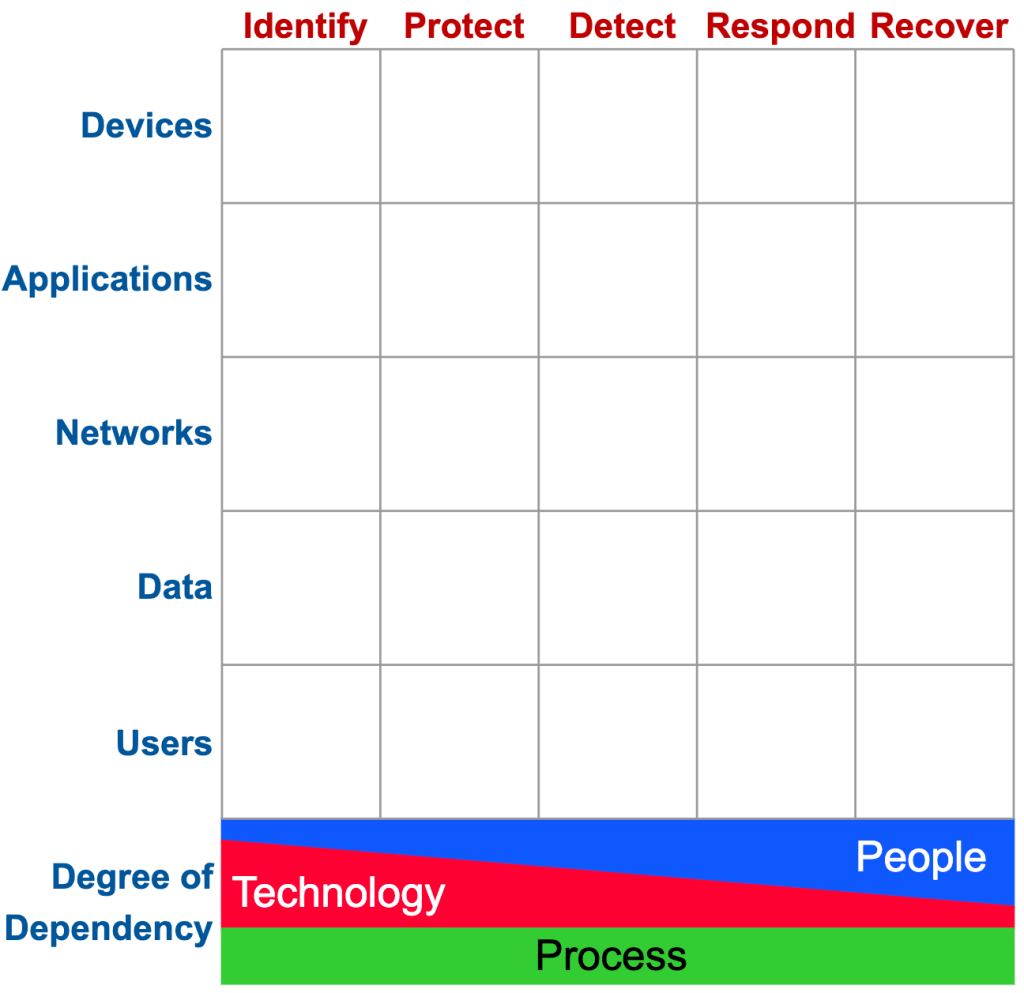
We’ll get to the stuff on the bottom in a minute.
Any cyber security tool should fit into one, and only one, of those boxes. Now, an offering from a vendor may include multiple tools that cover multiple boxes, but each tool itself should fit in one box.
Much of the book (several chapters) center around figuring out how to fit tools in the boxes. At first I hoped he would just go “And here it is, with every available tool filled in!” but instead he explains it and uses example which takes longer, but helps you understand the concept much better.
In any case, it can be hard to figure out which boxes certain tools belong in. For example, what about a vulnerability scanner? A vulnerability scanner looks at everything on the network to see if anything has unpatched vulnerabilities. You might think that would go in “Detect” but it actually goes in “Identify.” That seems counterintuitive, until we get to his explanation that really made it click for me.
He borrowed a term from the military (two terms, I guess):
- Left of boom
- Right of boom
In the military’s case “boom” refers to an IED or other bomb going off. Anything “left of boom” happens BEFORE the bomb goes off — they exist to keep bombs from going off. Anything “right of boom” happens AFTER a bomb has gone off — they exist to figure out what happened, and recover from it.
In the case of this matrix, the “boom” happens right between “Protect” and “Detect.” Identify and Protect are left of boom; Detect, Respond and Recover are right of boom.
Now it makes more sense that Vulnerability Scanning happens left of boom — you don’t scan when there has been an attack, you scan all the time to prevent an attack. And a scan is simply giving you more information about assets, thus it falls under “Identify.”
Sticking with vulnerabilities, the process of patching also falls left of boom, under protect. But a scanner that looks for indicators of compromise (that a vulnerability is being exploited in your environment) would fall right of boom.
It takes some getting used to, but eventually it begins to feel fairly intuitive.
What’s great is the flexibility of the model. I think providing a “grocery list” that you can use to map all of your current tools to is already a fantastic use-case — worth the price of admission for that alone. But Sounil expands on the concept in a lot of interesting ways, spending chapters on:
- Mapping metrics to the matrix to determine effectiveness
- Using it to create a security roadmap
- Using it to improve situational awareness
- Using it to map responsibilities
- Even using it to guide investments in new cybersecurity firms
But even without all that, it’s still very useful. In fact, you can use it right away if you manage cyber security. Draw the matrix up on a whiteboard, get a list of all the cyber tools deployed in your environment, and then put each one in a box. What blanks do you have? What areas are you doubling or tripling up on? You may be surprised at the utility of just this simple exercise.
What about the bottom part?
Below the matrix you see the “foundation” — what Sounil is trying to demonstrate here is that tools on the far left tend to rely more on technology and less on people, but people become more and more important the further right a capability is. Because of this, we see WAY more products on the left side of the matrix than on the right.
He actually called this pattern out in a recent keynote address, and proposed some directions the industry as a whole should take. What’s interesting is that his prediction that recovery is the next big area that needs a shakeup is supported by a recent interview with Ukraine’s cyberwar chief where he said:
“The efficiency of any cyber combat efforts should be judged not by the fact that we make it impossible for the attackers to attack us. The real test of how well we perform is the [speed] with which services can be relaunched, and the fact no important data is stolen by perpetrators.”
For now, recovery is a capability that often requires lots of human intervention, but there are technologies being deployed now that will make it more and more automated, and when a ransomware attack can be recovered from within minutes, it makes them no longer worth the attackers time.
 Josh Boyles